I purchased an IBM M1015 to use as an HBA in my server. As part of that, I wanted to flash it with the IT firmware, however, I was getting errors, even when I used the original IBM firmware from their website (my mirror copy):
C:\> megarec -cleanflash 0 M1000FW.ROM

MegaRAID HWR Controller Recovery tool. Version 01.01-004 February 05, 2010
Copyright (c) 2006-2008 LSI Corp.
Supports 1079 controller and its Successors


Erasing Flash Chip (8MB)....
 Completed: 100%
Flashing Image. Please wait...


Currently flashing component = BIOS
Programming Flash....
 Completed: 100%
Verifying the Flashed Data...


Currently flashing component = HIIM
Programming Flash....
 Completed: 100%
Verifying the Flashed Data...


Currently flashing component = APP
Error in downloading the image.
Error code = 64
Failed to flash the image. Please retry recovery
I’d never seen an M1015 before, at least not close up. Closer inspection of the card, however, revealed a code: FRU 46C8927. I know FRU" means “Field Replaceable Unit” i.e. something you can order as a replacement part. So I googled that code, and discovered that this was an IBM M5015, not an M1015. The M5015 cannot be used in IT mode, so I had to send it back.
First things first - you do this at your own risk. I take no responsibility for anything going wrong - and it can go wrong. If you are in doubt - don’t do it. And if it goes wrong - don’t blame me…
Download the firwmare files from here: sas2008 (see footnote for original source)
Extract the files and place them on the root of the USB stick.
Download the latest LSI firmware from the Avago site. You’re looking for Firmware for an SAS 9211-8i Host Bus Adaptor. At the time of writing, this is version P20.
Extract the LSI firmware to a folder on your machine.
Create a subfolder on the USB called P20
From the extracted LSI firmware, copy the following to the P20 folder on the USB:
The 2118it.bin file from <zip>\\firmware\\HBA_9211_8i_IT folder
mptsas2.rom from sasbios_rel folder
sas2flsh.exe from sas2flash_dos_rel folder
Look at the back of the card and note down the SAS address - it’s something like 500605B0xxxxxxxx.
put the card in the machine, and switch it on.
Boot to the USB stick - press F11 during POST and select USB.
Flash the firmware:
Type the following: megarec -writesbr 0 sbrempty.bin megarec -cleanflash 0
Type the following: megarec -writesbr 0 sbrempty.bin megarec -cleanflash 0
Reboot, again booting from the USB stick
Next, install the P10 or P11 firmware - type the following: sas2flsh -o -f 2118it.bin -b mptsas2.rom sas2flsh -o -sasadd 500605bxxxxxxxxx (x= numbers for SAS address)
Reboot, again booting from the USB stick
Finally, upgrade to the P20 firmware - type the following to change to the folder and execute flash of the new firmware: cd p20 sas2flsh -o -f 2118it.bin -b mptsas2.rom
Remove the USB stick
Reboot.
Some people recommend to disable loading the Option ROM. On my machine, loading the option room caused an NMI, so i ignored it, but if you want to do it: Load the Option ROM (press CTRL-C on boot) and set “Boot Support” to “Disabled”
The original instructions for this task are here, with my additions to update to the P20 firmware - I’ve archived them here for my own reference.
This post is the second in my series describing how i migrated from Unraid to Napp-It, and describes how I prepared for migration.
So - preparing for migration…
First, i wanted to capture the docker configuration for each of my existing containers. To do this, I forced the container to update, then when unraid presented me with the “success” screen, I captured the docker run command, like this (which captures the RUN command for my CUPS container with Google Print extensions): root@localhost:# /usr/local/emhttp/plugins/dynamix.docker.manager/scripts/docker run -d –name=“cups-google-print” –net=“host” –privileged=“true” -e TZ=“UTC” -e HOST_OS=“unRAID” -e “CUPS_USER_ADMIN”=“admin” -e “CUPS_USER_PASSWORD”=“pass” -e “TCP_PORT_631”=“631” -v “/mnt/user/appdata/cups-google-print”:"/config":rw -v /dev:/dev -v /etc/avahi/services:/avahi -v /var/run/dbus:/var/run/dbus mnbf9rca/cups-google-print
During the process of installing VMWare on to my Gen8 Microserver, I had trouble writing data to the internal SD card - in fact, I couldn’t even see it. Looking in the ILO Event Logs I saw this:
Embedded Flash/SD-CARD: Embedded media manager failed initialization.
googling this didn’t get me much - just forum posts with people complaining about it, but then i found this HPE Customer Advisory, which lists out the steps needed to reset the error. Basically:
I’ve been a user of Unraid since 2012, when I had to find a solution to my home storage after Windows Home Server was abandoned by Microsoft. Unraid has been very good for me, and the introduction of a Docker engine with Unraid 6 was very welcome. That said, I’ve recently encountered issues with bitrot, and the fact that unraid can’t use ZFS as the disk format annoys me. LimeTech claim that their parity check process should detect bitrot - however, something doesn’t seem to be working, as using using the Dynamix File Integrity plugin i can see it happening. In any case, knowing it’s happened isnt the same as being able to correct it, which just isn’t possible on Unraid without using BTRFS but many people simply don’t trust BTRFS, and besides, I fancy a change. So - over to VMWare EXSi and ZFS on Napp-It.
When installing Webmin, I’ve sometimes come across an error installing a dependency package, apt-show-versions:
Setting up apt-show-versions (0.22.7) ...
** initializing cache. This may take a while **
FATAL -> Failed to fork.
dpkg: error processing package apt-show-versions (--configure):
subprocess installed post-installation script returned error exit status 100
dpkg: dependency problems prevent configuration of webmin:FATAL -> Failed to fork.
This is caused by the fact that apt-show-versions can’t read compressed index files. Thankfully, the solution is quite simple:
As I’ve been playing around with Azure Functions I’ve slowly outgrown the web-based editor. It’s not that it’s not useful, it’s just that I miss intellisense (I’ll come back to this in a later post), and I accidentally deployed a change which broke one of my functions. I’d made dozens of tiny changes, but I simply could not figure out which one it was. Not having a version history, I was kinda screwed.
I accidentally deployed a dodgy bit of code to one of my function apps. Then, even when I tried to revert to a “known good” version of my code via the GUI, it still didn’t work. No matter what I did, I kept getting the dreaded “Compilation Failed” error - but there was no more information. No useful compilation errors…
2016-10-23T20:35:46.853 Function started (Id=5ededb27-6144-40d1-8d14-8db77d70b771)
2016-10-23T20:35:47.901 Function compilation error
2016-10-23T20:35:47.901 Function completed (Failure, Id=5ededb27-6144-40d1-8d14-8db77d70b771)
2016-10-23T20:35:48.369 Exception while executing function: Functions.fetchDepartureBoardOrchestrator. Microsoft.Azure.WebJobs.Script: Script compilation failed.
It was so frustrating. Until I worked out that you can actually restart the power app host - just go to the Function App Settings then click “Go To App Service Settings” at the bottom. You’ll see the traditional “full” properties and settings blade, and at the top is a “Restart” button. Then I was able to save my updated code.
I’ve been playing around with my Nextion and a Particle Photon for a while. The idea is to pull data from a variety of services and have it available on a display by the front door - things like the weather, the outside temperature (from my Netatmo), and the next 3 trains to Seven Sisters from our station. Living, as we do, at the end of the Enfield Town branch line, it can be a bit hit and miss as to whether or not you make the train, or if it’s even running.
While trying to install the C# scripting package Microsoft.CodeAnalysis.CSharp.Scripting from nuget, but was getting odd messages about missing dependencies. I spent ages trying to figure it out as all the dependency versions appeared to match (e.g.
Unable to find a version of 'Microsoft.CodeAnalysis.Common' that is compatible with 'Microsoft.CodeAnalysis.CSharp 2.0.0 constraint: Microsoft.CodeAnalysis.Common (= 2.0.0)', 'Microsoft.CodeAnalysis.Scripting.Common 2.0.0 constraint: Microsoft.CodeAnalysis.Common (= 2.0.0)'
however, eventually I discovered that you neeed .NET 4.6. Doh!
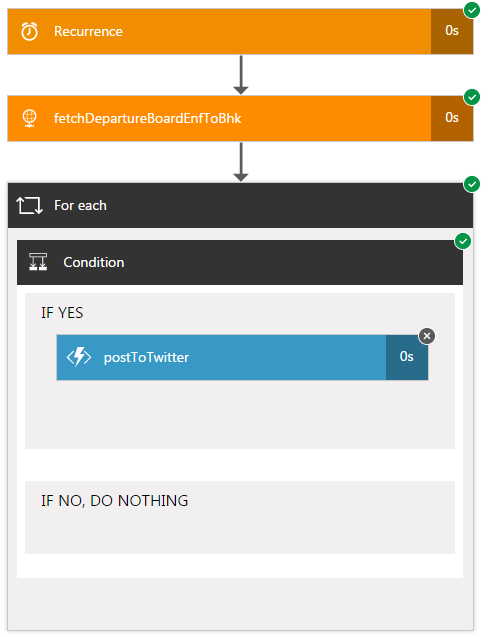
I started writing EnfieldTownBot using Azure Logic Apps. It’s pretty easy, but i soon hit a challenge - it’s so expensive! My app was pretty simple - a trigger, a “for…each”, a condition and a http callout to my Twitter Poster Function App:
So - if there are no delays, that’s (recurrence + httprequest + foreach + 3 x (condition)) = 6 actions. There could be up to 9 if the postToTwitter action also triggers. I want to run this function 2x (once for trains FROM Enfield Town, once for trains TO Enfield Town), so that’s 12-18 actions per request. And I want to run it every 15-30 seconds to get the latest information published ASAP. So that’s 48-72 actions per minute. Over a day, that’s 69,120 to 103,680 actions. Over a (31 day) month, that’s 2,142,720 to 3,214,080 actions. Taking a mean of these (2,678,400), and looking at the current pricing, it would cost me £450 a month to run this app. Wow. I don’t care about late trains THAT much…
After my last post, I spent some time looking through this. Eventually, I found a really lightweight class which does what i need.
After spending some time adding some error handling to the api.request() method, I then wrapped a webrequest around it and created a function app. You can find it here: https://github.com/mnbf9rca/TwitterFunctionApp
Earlier this year, we got a new car, a BMW 3 series. It came subscribed to the BMW ConnectedDrive service, and that comes with an iPhone or Android app. So, of course, I immediately set about deconstructing the traffic to figure out what was going on, inspired by the work of Terence Eden. Unfortunately, BMW appears to have implemented certificate pinning in the time since Terrence wrote his paper, so my favourite tool, Charles Proxy, was useless - the BMW app simply dropped the connection.
I have to say that the twitter API documentation is absolutely abysmal. It’s impossible to navigate - calls make reference to other calls but the major problem is that there are almost no examples - they almost all recommend that you use a library. So how on earth are you supposed to learn how the API works? How do you write a bot which tweets as itself (such as my https://twitter.com/EnfieldTownBot)?
When we bought our house a few years ago, we totally gutted it and one of the things we installed was an evohome heating system. Honeywell has an iphone app for the evohome, so recently, I decided to explore the API. Unfortunately, Honeywell doesn’t seem to offer a public API, so I spent a bit of time deconstructing the app with the help of the excellent Charles Proxy.