I accidentally deployed a dodgy bit of code to one of my function apps. Then, even when I tried to revert to a “known good” version of my code via the GUI, it still didn’t work. No matter what I did, I kept getting the dreaded “Compilation Failed” error - but there was no more information. No useful compilation errors…
2016-10-23T20:35:46.853 Function started (Id=5ededb27-6144-40d1-8d14-8db77d70b771)
2016-10-23T20:35:47.901 Function compilation error
2016-10-23T20:35:47.901 Function completed (Failure, Id=5ededb27-6144-40d1-8d14-8db77d70b771)
2016-10-23T20:35:48.369 Exception while executing function: Functions.fetchDepartureBoardOrchestrator. Microsoft.Azure.WebJobs.Script: Script compilation failed.
It was so frustrating. Until I worked out that you can actually restart the power app host - just go to the Function App Settings then click “Go To App Service Settings” at the bottom. You’ll see the traditional “full” properties and settings blade, and at the top is a “Restart” button. Then I was able to save my updated code.
I’ve been playing around with my Nextion and a Particle Photon for a while. The idea is to pull data from a variety of services and have it available on a display by the front door - things like the weather, the outside temperature (from my Netatmo), and the next 3 trains to Seven Sisters from our station. Living, as we do, at the end of the Enfield Town branch line, it can be a bit hit and miss as to whether or not you make the train, or if it’s even running.
While trying to install the C# scripting package Microsoft.CodeAnalysis.CSharp.Scripting from nuget, but was getting odd messages about missing dependencies. I spent ages trying to figure it out as all the dependency versions appeared to match (e.g.
Unable to find a version of 'Microsoft.CodeAnalysis.Common' that is compatible with 'Microsoft.CodeAnalysis.CSharp 2.0.0 constraint: Microsoft.CodeAnalysis.Common (= 2.0.0)', 'Microsoft.CodeAnalysis.Scripting.Common 2.0.0 constraint: Microsoft.CodeAnalysis.Common (= 2.0.0)'
however, eventually I discovered that you neeed .NET 4.6. Doh!
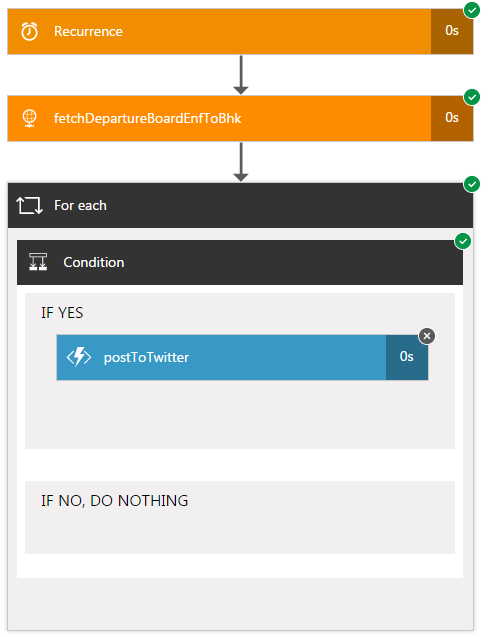
I started writing EnfieldTownBot using Azure Logic Apps. It’s pretty easy, but i soon hit a challenge - it’s so expensive! My app was pretty simple - a trigger, a “for…each”, a condition and a http callout to my Twitter Poster Function App:
So - if there are no delays, that’s (recurrence + httprequest + foreach + 3 x (condition)) = 6 actions. There could be up to 9 if the postToTwitter action also triggers. I want to run this function 2x (once for trains FROM Enfield Town, once for trains TO Enfield Town), so that’s 12-18 actions per request. And I want to run it every 15-30 seconds to get the latest information published ASAP. So that’s 48-72 actions per minute. Over a day, that’s 69,120 to 103,680 actions. Over a (31 day) month, that’s 2,142,720 to 3,214,080 actions. Taking a mean of these (2,678,400), and looking at the current pricing, it would cost me £450 a month to run this app. Wow. I don’t care about late trains THAT much…
After my last post, I spent some time looking through this. Eventually, I found a really lightweight class which does what i need.
After spending some time adding some error handling to the api.request() method, I then wrapped a webrequest around it and created a function app. You can find it here: https://github.com/mnbf9rca/TwitterFunctionApp
Earlier this year, we got a new car, a BMW 3 series. It came subscribed to the BMW ConnectedDrive service, and that comes with an iPhone or Android app. So, of course, I immediately set about deconstructing the traffic to figure out what was going on, inspired by the work of Terence Eden. Unfortunately, BMW appears to have implemented certificate pinning in the time since Terrence wrote his paper, so my favourite tool, Charles Proxy, was useless - the BMW app simply dropped the connection.