TRMNL is an awesome open-source ePaper display that lets users show almost anything they want. Launched on Kickstarter, it’s now got thousands of plugins and users. I’ve published a few plugins myself. A few weeks ago, TRMNL added an MCP server. This lets you use a local coding agent to do most of the grunt work. I wrote about how to set that up in another post.
Secret disclosure
As soon as i’d set up the MCP server, i asked Claude to test it against a plugin i’d already built and deployed. The model called IntegrationsShowTool with no arguments. The response included:
To stop my API keys being sucked up by some random malware, I keep secrets in 1Password and inject them into commands at runtime with op run. That works for almost everything, but when using Claude Code, i started getting a confusing error message.
Injecting MCP API keys to Claude Code
Claude Code reads MCP server config from .mcp.json and expands ${VAR} references from the environment.
Although builds were succeeding locally, during CI builds were failing on Linux with the error Error: Cannot find module @rollup/rollup-linux-x64-gnu. npm has a bug related to optional dependencies. The log suggested removing package-lock.json - but this obviously breaks deterministic builds.
The root cause is a missing dependency - specifically, when Rollup needs native binaries for performance optimisation. Mac-generated lockfiles won’t include Linux-specific optional dependencies. First noted in npm bug 4828, it was fixed in npm 11.3.0+, but adding an explicit optional dependency prevents edge cases.
This post is mainly a reminder to myself, because i’ve made the same mistake a few times in different projects.
How and why to deploy Azure functions from a package
When using Azure Functions, you can simplify deployment and maintenance of your function by deploying from a package file rather than directly in to the function. This also has the benefit of reducing cold start times, particularly where there are a large number of dependencies.
If you run in a dedicated mode, you need to turn on the Always On setting for your Function App to run properly … When running in a Consumption Plan or Premium Plan you should not enable Always On.
When uploading images to Wordpress, you may get this error. There are plenty of blogs online offering solutions, but they only apply to self-hosted instances - mine is hosted on just-what-i-find.onyx-sites.io/.
The error is a little pop up with the text The response is not a valid JSON response at the bottom of the screen when you try and upload an image:
When running apt-get update i was seeing these errors:
W: http://security.ubuntu.com/ubuntu/dists/jammy-security/InRelease: The key(s) in the keyring /etc/apt/trusted.gpg.d/postgres.gpg are ignored as the file is not readable by user '_apt' executing apt-key.
W: https://packagecloud.io/timescale/timescaledb/ubuntu/dists/jammy/InRelease: Key is stored in legacy trusted.gpg keyring (/etc/apt/trusted.gpg), see the DEPRECATION section in apt-key(8) for details.
Although the warning is annoying, it doesn’t stop things updating. I understand the reasons why the legacy keyring is being removed.
Some repos, such a the one for the Unifi Controller, use different ‘field’ values to tie a release and require manual updates. For someone like me who has a standalone, automated controller setup designed mainly to keep the firmware up to date without much intervention, this is a hassle. It looks something like this:
robert@unifi:~$ sudo apt-get update
[sudo] password for robert:
Hit:1 http://mirrors.linode.com/ubuntu bionic InRelease
Get:2 http://mirrors.linode.com/ubuntu bionic-updates InRelease [88.7 kB]
Get:3 http://security.ubuntu.com/ubuntu bionic-security InRelease [88.7 kB]
Get:4 http://mirrors.linode.com/ubuntu bionic-backports InRelease [74.6 kB]
Ign:5 http://repo.mongodb.org/apt/ubuntu xenial/mongodb-org/3.4 InRelease
Hit:6 http://repo.mongodb.org/apt/ubuntu xenial/mongodb-org/3.4 Release
Get:7 https://dl.ubnt.com/unifi/debian stable InRelease [3,024 B]
Reading package lists... Done
E: Repository 'https://dl.ubnt.com/unifi/debian stable InRelease' changed its 'Codename' value from 'unifi-5.12' to 'unifi-5.13'
N: This must be accepted explicitly before updates for this repository can be applied. See apt-secure(8) manpage for details.
It’s an easy fix. Just tell apt-get to ignore the codename field:
The ZFS Pool on my server was showing degraded state. After checking the SMART status of the constituent drives and finding no problem, I discovered that there’s a bug in Solaris 10.5 where the system reports a growing number of errors and eventually fails the pool. dmesg shows an error unable to kmem_alloc enough memory for scatter/gather list, however, there is actually nothing wrong with the pool. Running zpool status shows degraded state:
Some of my docker containers were complaining that they didn’t have enough drive space. This looked odd - so i logged in to the host and checked around:
I purchased an IBM M1015 to use as an HBA in my server. As part of that, I wanted to flash it with the IT firmware, however, I was getting errors, even when I used the original IBM firmware from their website (my mirror copy):
C:\> megarec -cleanflash 0 M1000FW.ROM

MegaRAID HWR Controller Recovery tool. Version 01.01-004 February 05, 2010
Copyright (c) 2006-2008 LSI Corp.
Supports 1079 controller and its Successors


Erasing Flash Chip (8MB)....
 Completed: 100%
Flashing Image. Please wait...


Currently flashing component = BIOS
Programming Flash....
 Completed: 100%
Verifying the Flashed Data...


Currently flashing component = HIIM
Programming Flash....
 Completed: 100%
Verifying the Flashed Data...


Currently flashing component = APP
Error in downloading the image.
Error code = 64
Failed to flash the image. Please retry recovery
I’d never seen an M1015 before, at least not close up. Closer inspection of the card, however, revealed a code: FRU 46C8927. I know FRU" means “Field Replaceable Unit” i.e. something you can order as a replacement part. So I googled that code, and discovered that this was an IBM M5015, not an M1015. The M5015 cannot be used in IT mode, so I had to send it back.
During the process of installing VMWare on to my Gen8 Microserver, I had trouble writing data to the internal SD card - in fact, I couldn’t even see it. Looking in the ILO Event Logs I saw this:
Embedded Flash/SD-CARD: Embedded media manager failed initialization.
googling this didn’t get me much - just forum posts with people complaining about it, but then i found this HPE Customer Advisory, which lists out the steps needed to reset the error. Basically:
When installing Webmin, I’ve sometimes come across an error installing a dependency package, apt-show-versions:
Setting up apt-show-versions (0.22.7) ...
** initializing cache. This may take a while **
FATAL -> Failed to fork.
dpkg: error processing package apt-show-versions (--configure):
subprocess installed post-installation script returned error exit status 100
dpkg: dependency problems prevent configuration of webmin:FATAL -> Failed to fork.
This is caused by the fact that apt-show-versions can’t read compressed index files. Thankfully, the solution is quite simple:
As I’ve been playing around with Azure Functions I’ve slowly outgrown the web-based editor. It’s not that it’s not useful, it’s just that I miss intellisense (I’ll come back to this in a later post), and I accidentally deployed a change which broke one of my functions. I’d made dozens of tiny changes, but I simply could not figure out which one it was. Not having a version history, I was kinda screwed.
I accidentally deployed a dodgy bit of code to one of my function apps. Then, even when I tried to revert to a “known good” version of my code via the GUI, it still didn’t work. No matter what I did, I kept getting the dreaded “Compilation Failed” error - but there was no more information. No useful compilation errors…
2016-10-23T20:35:46.853 Function started (Id=5ededb27-6144-40d1-8d14-8db77d70b771)
2016-10-23T20:35:47.901 Function compilation error
2016-10-23T20:35:47.901 Function completed (Failure, Id=5ededb27-6144-40d1-8d14-8db77d70b771)
2016-10-23T20:35:48.369 Exception while executing function: Functions.fetchDepartureBoardOrchestrator. Microsoft.Azure.WebJobs.Script: Script compilation failed.
It was so frustrating. Until I worked out that you can actually restart the power app host - just go to the Function App Settings then click “Go To App Service Settings” at the bottom. You’ll see the traditional “full” properties and settings blade, and at the top is a “Restart” button. Then I was able to save my updated code.
While trying to install the C# scripting package Microsoft.CodeAnalysis.CSharp.Scripting from nuget, but was getting odd messages about missing dependencies. I spent ages trying to figure it out as all the dependency versions appeared to match (e.g.
Unable to find a version of 'Microsoft.CodeAnalysis.Common' that is compatible with 'Microsoft.CodeAnalysis.CSharp 2.0.0 constraint: Microsoft.CodeAnalysis.Common (= 2.0.0)', 'Microsoft.CodeAnalysis.Scripting.Common 2.0.0 constraint: Microsoft.CodeAnalysis.Common (= 2.0.0)'
however, eventually I discovered that you neeed .NET 4.6. Doh!
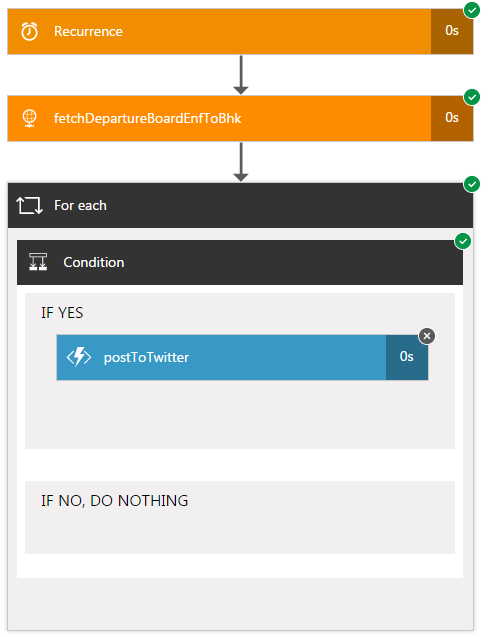
I started writing EnfieldTownBot using Azure Logic Apps. It’s pretty easy, but i soon hit a challenge - it’s so expensive! My app was pretty simple - a trigger, a “for…each”, a condition and a http callout to my Twitter Poster Function App:
So - if there are no delays, that’s (recurrence + httprequest + foreach + 3 x (condition)) = 6 actions. There could be up to 9 if the postToTwitter action also triggers. I want to run this function 2x (once for trains FROM Enfield Town, once for trains TO Enfield Town), so that’s 12-18 actions per request. And I want to run it every 15-30 seconds to get the latest information published ASAP. So that’s 48-72 actions per minute. Over a day, that’s 69,120 to 103,680 actions. Over a (31 day) month, that’s 2,142,720 to 3,214,080 actions. Taking a mean of these (2,678,400), and looking at the current pricing, it would cost me £450 a month to run this app. Wow. I don’t care about late trains THAT much…
Earlier this year, we got a new car, a BMW 3 series. It came subscribed to the BMW ConnectedDrive service, and that comes with an iPhone or Android app. So, of course, I immediately set about deconstructing the traffic to figure out what was going on, inspired by the work of Terence Eden. Unfortunately, BMW appears to have implemented certificate pinning in the time since Terrence wrote his paper, so my favourite tool, Charles Proxy, was useless - the BMW app simply dropped the connection.